CES S3 Performance: Round-Robin vs. Bucket-Sticky Routing
Background
A customer has been reporting poor S3 performance and intermittent client-side timeouts when
working against IBM Storage Scale CES S3. The symptom pattern – high tail latency rather than
consistently low throughput – has long made naive round-robin load balancing a suspect. When a
load balancer distributes individual S3 requests across all CES nodes without any affinity, a
sequence of operations on the same object (PUT → GET → DELETE, or the multiple requests of a
multipart upload) will typically land on different backend nodes. Each such cross-node hop
requires the receiving node to coordinate with the node that originally handled the write –
reading metadata from GPFS, acquiring locks, and flushing caches – all of which adds latency
and variance, and under load can cascade into the kind of timeouts a client would observe.
To quantify this, a small lab environment was set up in Fyre.ibm.com
with one frontend running HAProxy in two modes:
- Round-Robin (
port 9999): all requests distributed equally across both CES nodes, no affinity. - Sticky / Bucket-affinity (
port 8888): requests are hashed on the bucket name using
consistent hashing, so all requests for a given bucket always go to the same CES node.
No performance tuning was applied to this environment – it is not a representative sizing
exercise. The expectation is that an untuned environment makes the relative effects of routing
strategy more visible, not less.
Lab Setup
Cluster
| Node | Role | IP |
|---|---|---|
ces-s3-frontend |
HAProxy, GPFS quorum | 10.15.8.107 |
ces-s3-backend1 |
CES S3 endpoint | 10.17.11.153 |
ces-s3-backend2 |
CES S3 endpoint | 10.15.244.186 |
OS: RHEL 9.8 · Scale: 6.0.1-2 · GPFS cluster: ces-s3.cluster, single filesystem /dev/scale
Page pool: 4 GiB (frontend), 8 GiB (backends)
CES S3 Configuration (relevant settings)
| Parameter | Value |
|---|---|
ENDPOINT_PORT |
6001 |
ENDPOINT_FORKS |
2 |
NSFS_NC_STORAGE_BACKEND |
GPFS |
NSFS_DIR_CACHE_MAX_TOTAL_SIZE |
1 GiB |
UVTHREADPOOLSIZE |
16 |
HAProxy Configuration
The sticky frontend extracts the bucket name from both virtual-hosted style
(<bucket>.s3.example.com) and path-style (/<bucket>/...) requests, then uses
balance hash var(txn.bucket) with consistent hashing to pin each bucket to one backend.
ListBuckets requests (no bucket in the path) are served by any node.
frontend s3_in          # sticky  — port 8888
    balance hash var(txn.bucket)
    hash-type consistent

frontend s3_in_random   # round-robin — port 9999
    default_backend s3_any
Full haproxy.cfg is reproduced in Appendix A.
Benchmark Tool
All benchmarks were run with warp (MinIO S3 benchmark tool).
Object size: 1 KiB. Concurrency: 20 (40 for multipart). Run duration: ~5 minutes
each, except DELETE which runs until objects are exhausted.
Before each benchmark run the warp bucket was reset to a clean state by deleting and recreating
the GPFS fileset that backs it:
mmunlinkfileset scale warp-benchmark-bucket
mmdelfileset scale warp-benchmark-bucket -f
mmcrfileset scale warp-benchmark-bucket --inode-space new --inode-limit 1M:1M \
    -J /scale/testaccount/warp-benchmark-bucket
chown 1234:1234 /scale/testaccount/warp-benchmark-bucket
This ensures each run starts from an empty, unfragmented fileset with no residual metadata
from previous runs that could skew results.
Results
1. PUT
Throughput – Sticky is 1.31× faster on average (648 vs. 495 obj/s).
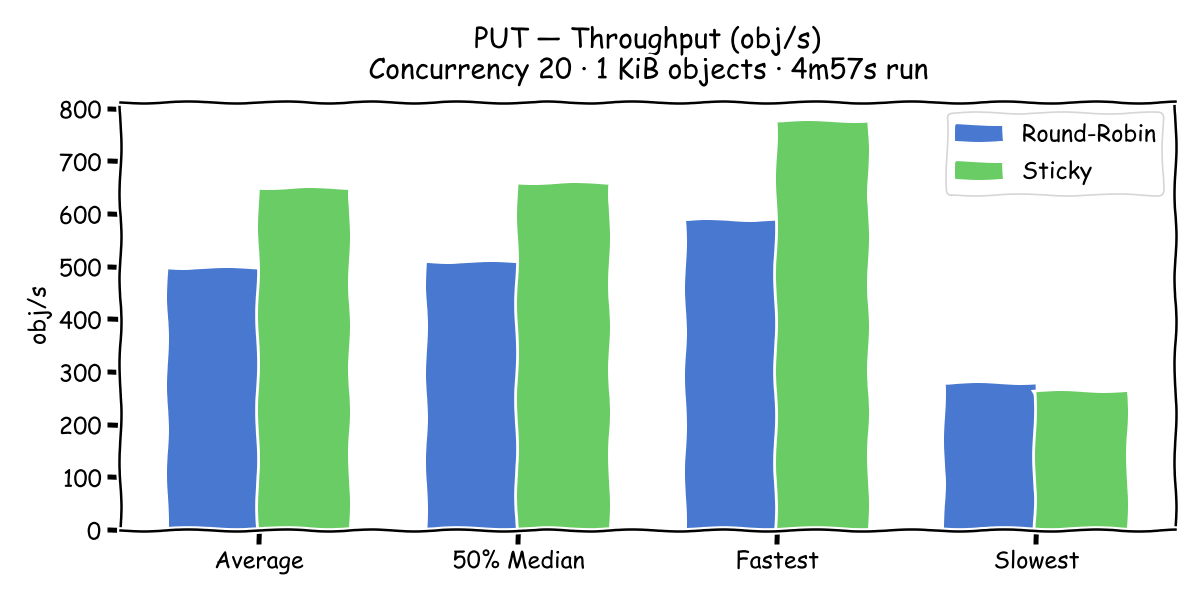
Latency – Average drops from 41 ms to 31 ms. The 99th percentile improves from 87 ms
to 56 ms. Standard deviation halves (16.6 ms → 9.1 ms).
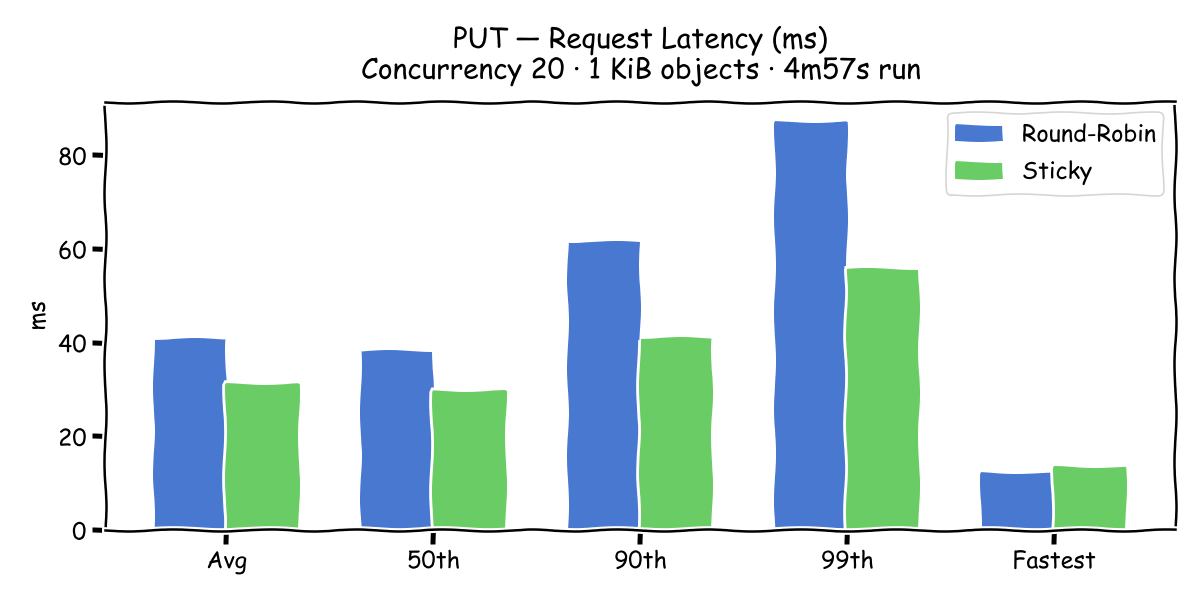
| Metric | Round-Robin | Sticky | Speedup |
|---|---|---|---|
| Average throughput | 495 obj/s | 648 obj/s | 1.31× |
| Avg latency | 40.9 ms | 31.2 ms | 1.31× |
| 99th percentile | 87.1 ms | 55.8 ms | 1.56× |
| StdDev | 16.6 ms | 9.1 ms | 1.82× |
2. Multipart PUT
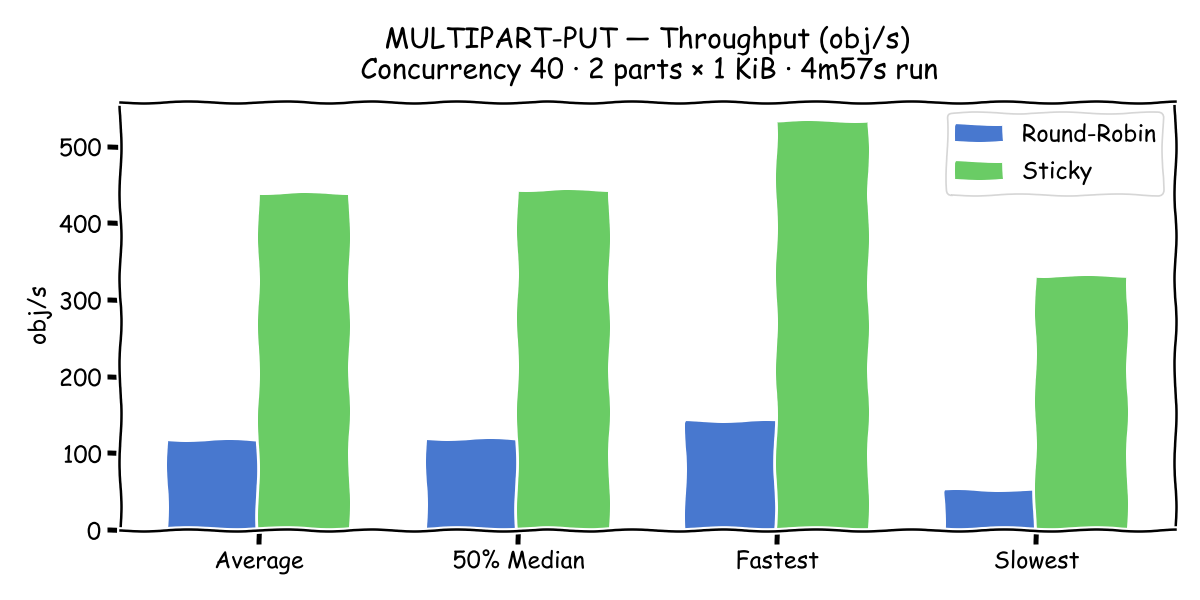
Throughput – Sticky is 3.78× faster (439 vs. 116 obj/s). This is the most dramatic
result in the entire benchmark. With round-robin, the parts of a single multipart upload are
distributed across both backends. Each UploadPart that lands on the non-owning node must
coordinate with the node that received CreateMultipartUpload, leading to severe lock
contention and repeated cross-node I/O.
Latency – Median drops from 53 ms to 21 ms; the 99th percentile from 183 ms to 45 ms.
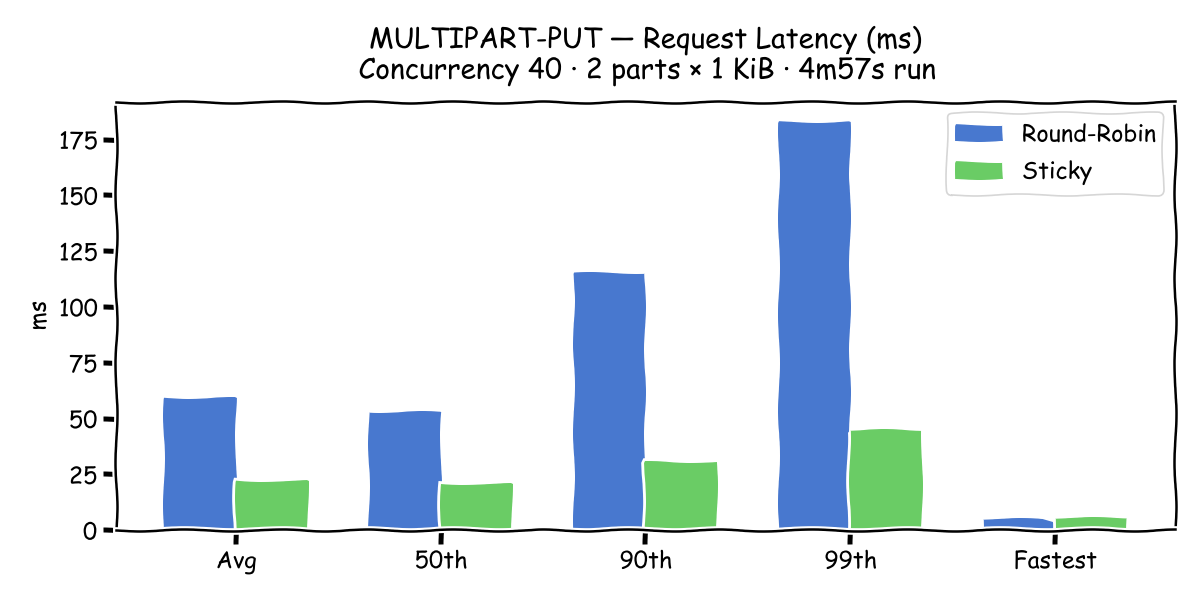
| Metric | Round-Robin | Sticky | Speedup |
|---|---|---|---|
| Average throughput | 116 obj/s | 439 obj/s | 3.78× |
| Avg latency | 59.4 ms | 21.9 ms | 2.71× |
| 99th percentile | 182.8 ms | 45.0 ms | 4.06× |
| StdDev | 41.8 ms | 8.2 ms | 5.10× |
Note: Many S3 clients – including AWS SDK, s3cmd, and rclone – automatically switch to
multipart upload for objects above a configurable threshold (commonly 8–64 MiB). A customer
uploading typical workload files will be hitting this path continuously. A 3.78× throughput
penalty and 4× tail latency penalty directly explains the client-side timeouts observed.
3. GET
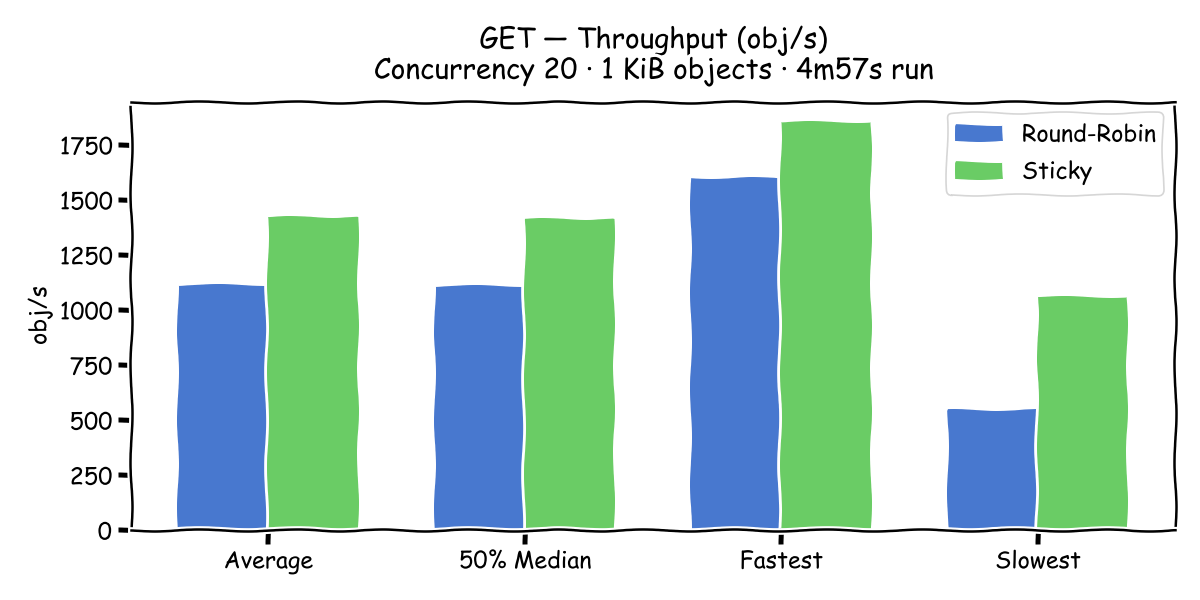
Throughput – Sticky is 1.28× faster on average (1424 vs. 1114 obj/s). The average
improvement is modest, but the trough throughput (worst 1-second window) nearly doubles:
1057 vs. 545 obj/s.
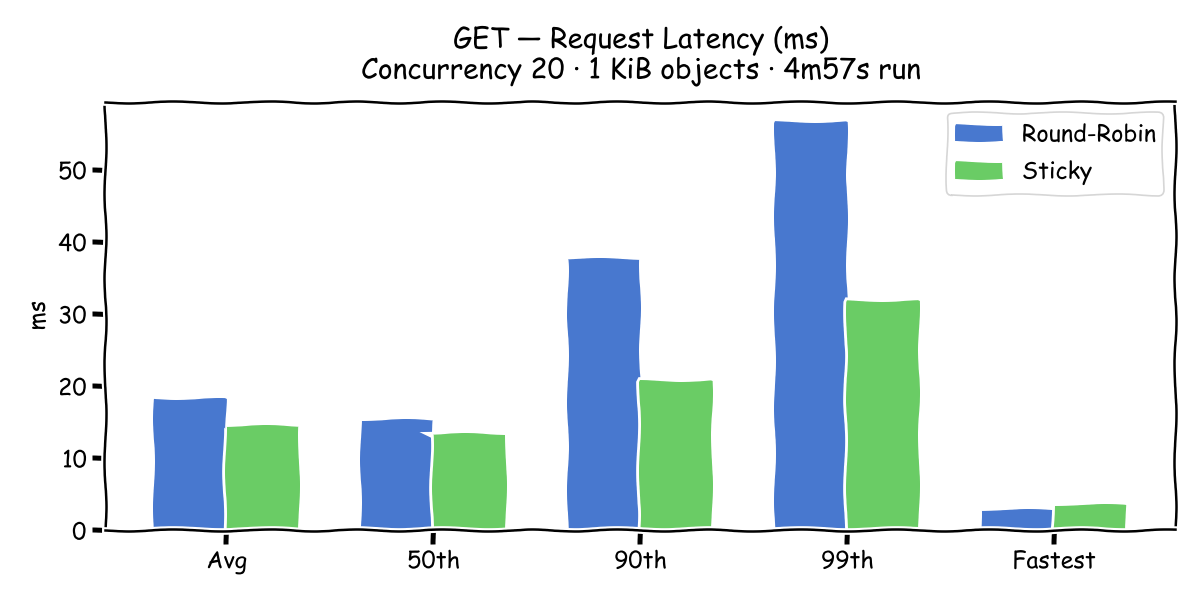
Latency – Median is similar (13 vs. 15 ms), but the 90th percentile nearly doubles with
round-robin (38 vs. 21 ms), and StdDev is 2.3× higher (15.9 vs. 6.9 ms).
| Metric | Round-Robin | Sticky | Speedup |
|---|---|---|---|
| Average throughput | 1,114 obj/s | 1,424 obj/s | 1.28× |
| 90th percentile | 37.6 ms | 20.7 ms | 1.82× |
| 99th percentile | 56.6 ms | 31.8 ms | 1.78× |
| StdDev | 15.9 ms | 6.9 ms | 2.30× |
GETs benefit from sticky routing because the node that wrote the object is more likely to have
its metadata and data blocks warm in the GPFS buffer cache.
4. STAT (HeadObject)
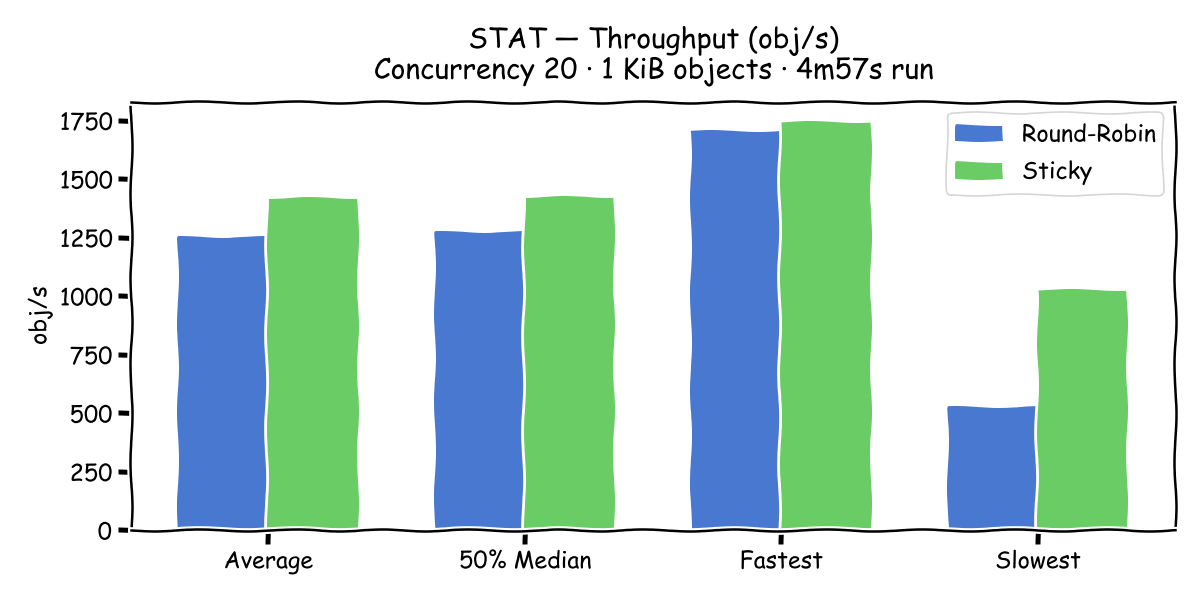
Throughput – Sticky is 1.13× faster (1420 vs. 1252 obj/s). The median latency is nearly
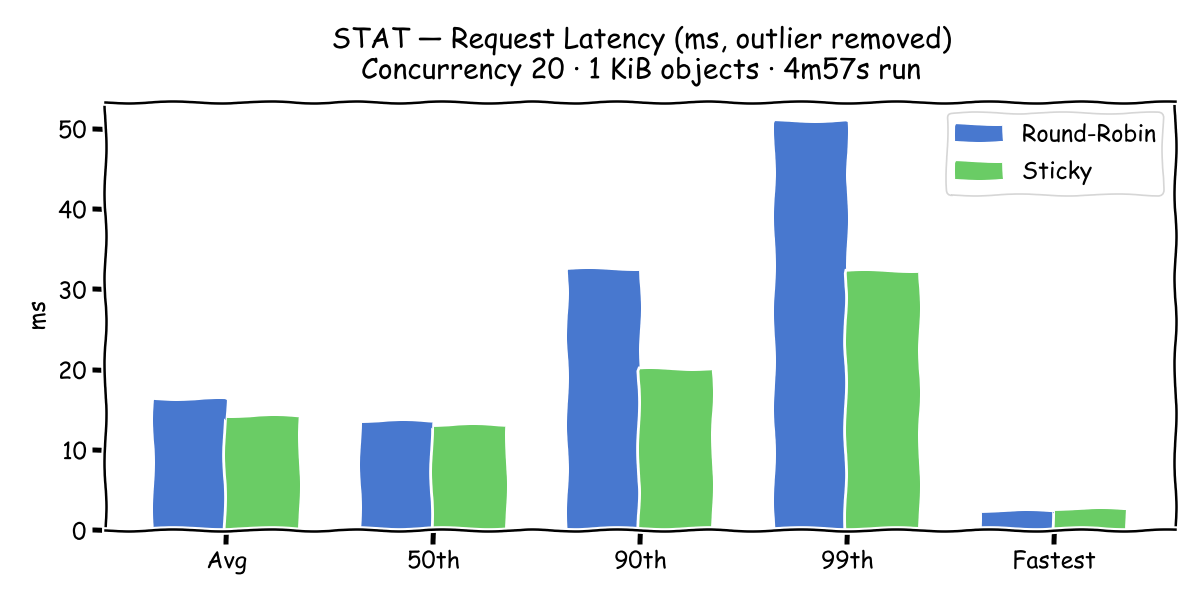
equal (13.0 vs. 13.5 ms), but the tail diverges significantly.
Latency (outlier removed)
| Metric | Round-Robin | Sticky | Speedup |
|---|---|---|---|
| Average throughput | 1,252 obj/s | 1,420 obj/s | 1.13× |
| 90th percentile | 32.4 ms | 20.0 ms | 1.62× |
| 99th percentile | 50.8 ms | 32.2 ms | 1.58× |
| Trough throughput | 525 obj/s | 1,028 obj/s | 1.96× |
| StdDev | 14.9 ms | 7.5 ms | 2.00× |
5. DELETE
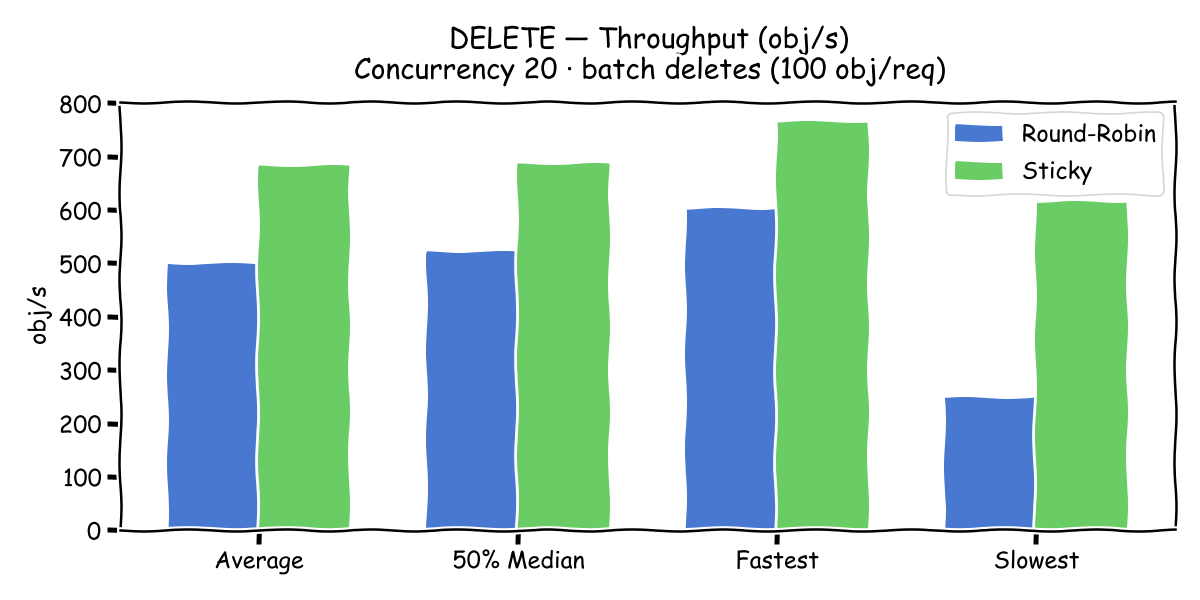
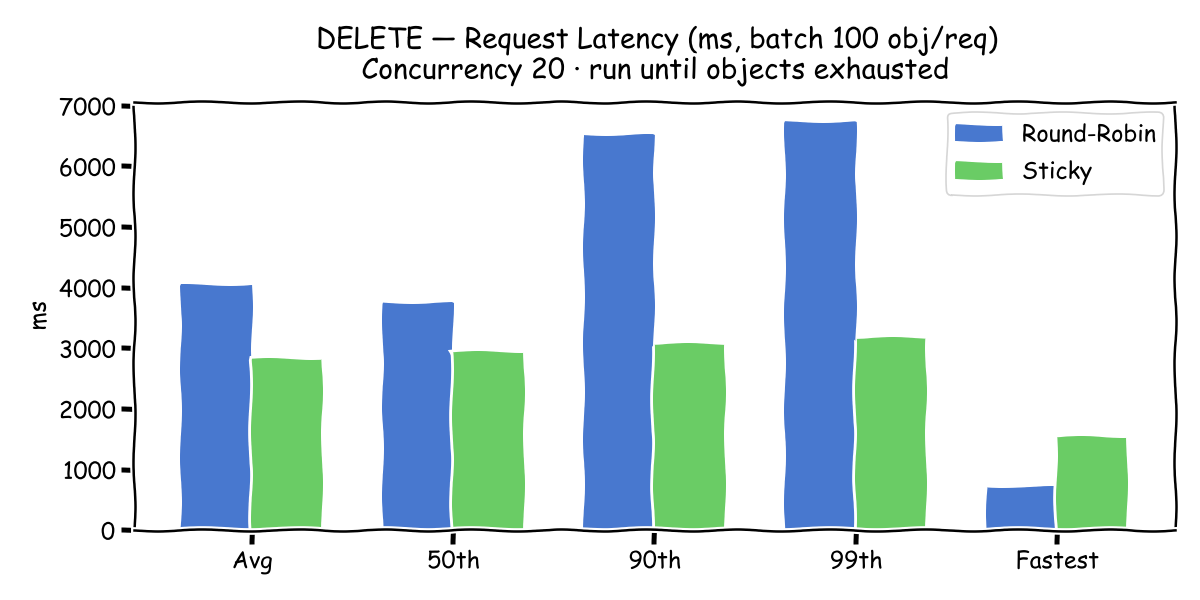
DELETE uses S3 batch-delete requests (100 objects per request), so individual request latency
is in the seconds range. Sticky is 1.37× faster overall, but the real story is in the tail:
round-robin worst-case latency is 9.96 seconds vs. 3.35 seconds for sticky – and the
standard deviation is 7.7× larger with round-robin (2035 ms vs. 264 ms).
| Metric | Round-Robin | Sticky | Speedup |
|---|---|---|---|
| Average throughput | 500 obj/s | 683 obj/s | 1.37× |
| Avg latency | 4,043 ms | 2,819 ms | 1.43× |
| 90th percentile | 6,514 ms | 3,070 ms | 2.12× |
| Worst case | 9,958 ms | 3,350 ms | 2.97× |
| StdDev | 2,035 ms | 264 ms | 7.71× |
6. LIST (ListObjects)
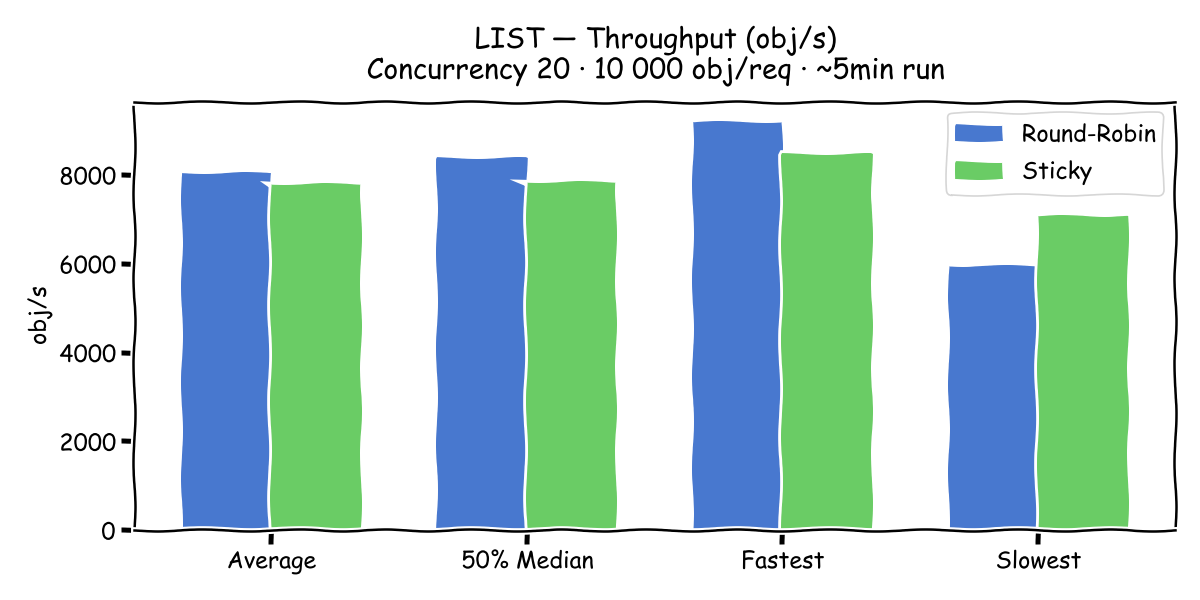
LIST is the exception – round-robin is marginally faster on average (+3%), because a
ListObjects scan must aggregate entries from across all nodes regardless of where the request
lands. With sticky routing, all list requests are funnelled through the owning node, which then
still has to read from all backends. With round-robin, list load is spread evenly. The sticky
advantage disappears here.
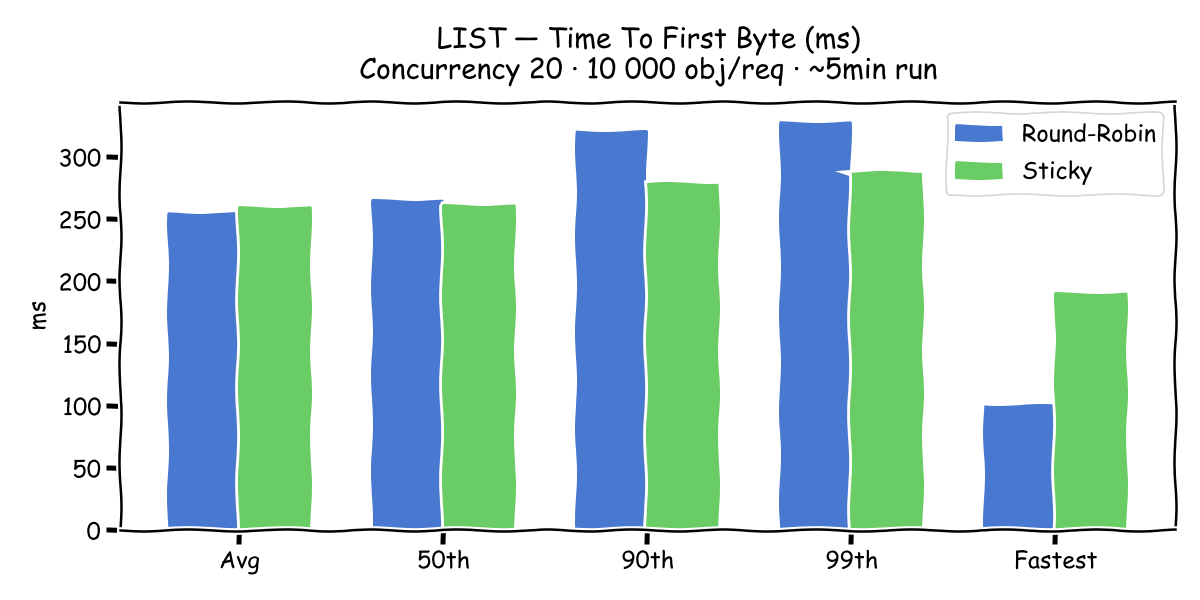
However, sticky still wins on consistency: its trough throughput is 19% higher (7086 vs.
5948 obj/s), and TTFB StdDev is 3.4× lower (14 ms vs. 48 ms).
| Metric | Round-Robin | Sticky | Winner |
|---|---|---|---|
| Average throughput | 8,040 obj/s | 7,808 obj/s | Round-Robin +3% |
| Trough throughput | 5,948 obj/s | 7,086 obj/s | Sticky +19% |
| TTFB StdDev | 48 ms | 14 ms | Sticky 3.4× |
7. Mixed Workload (DELETE + GET + PUT + STAT)
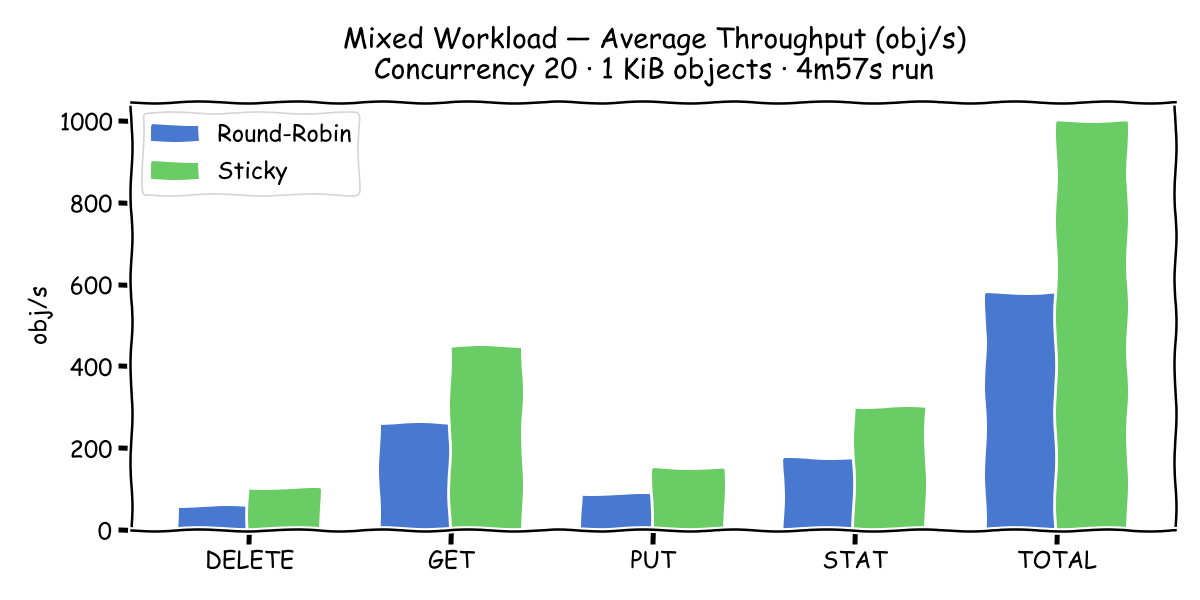
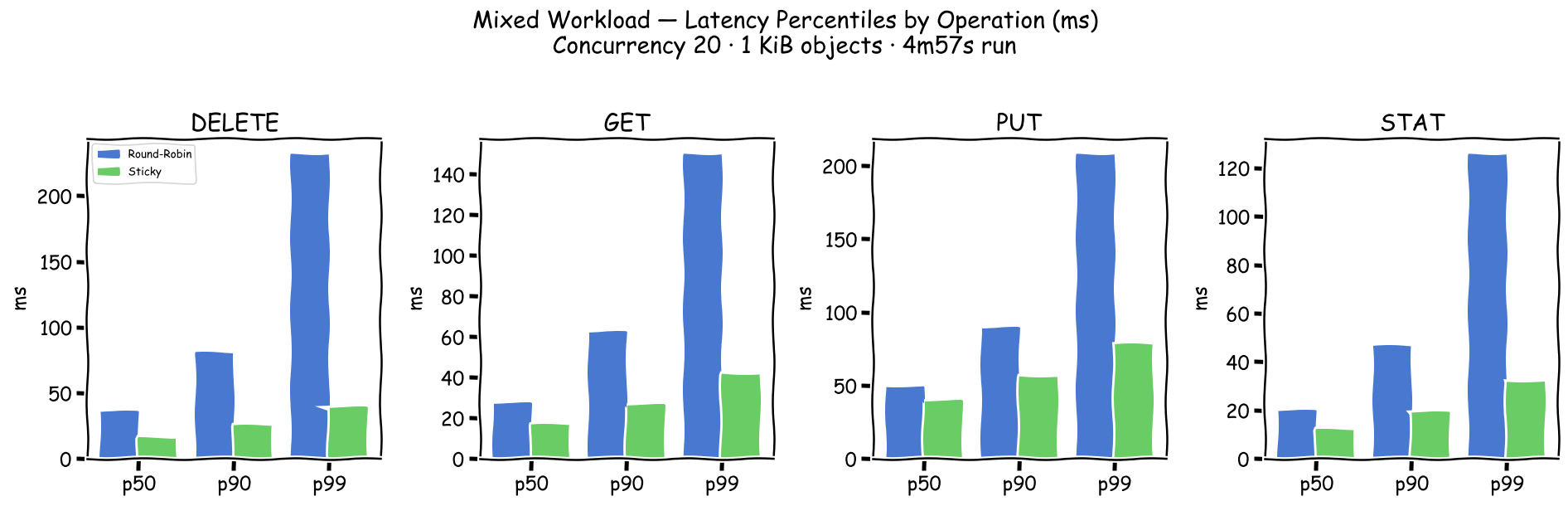
warp’s mixed mode runs all four operation types concurrently with fixed proportions under a
shared concurrency budget of 20. Sticky is 1.73× faster across every single operation type
– DELETE, GET, PUT, and STAT all improve by exactly the same factor. This uniformity is a
consequence of warp’s fixed-ratio concurrency allocation: the round-robin overhead acts as a
uniform multiplier on the whole pipeline.
| Operation | Round-Robin | Sticky | Speedup |
|---|---|---|---|
| DELETE | 58 obj/s | 100 obj/s | 1.73× |
| GET | 260 obj/s | 449 obj/s | 1.73× |
| PUT | 87 obj/s | 150 obj/s | 1.73× |
| STAT | 173 obj/s | 299 obj/s | 1.73× |
| Total | 577 obj/s | 997 obj/s | 1.73× |
Summary
| Operation | Throughput speedup | 99th pct improvement | StdDev improvement |
|---|---|---|---|
| PUT | 1.31× | 1.56× | 1.82× |
| Multipart PUT | 3.78× | 4.06× | 5.10× |
| GET | 1.28× | 1.78× | 2.30× |
| STAT | 1.13× | 1.58× | 2.00× |
| DELETE | 1.37× | 2.12× (p90) | 7.71× |
| LIST | 0.97× (round-robin wins) | - | Sticky 3.4× |
| Mixed | 1.73× | - | - |
Key findings:
-
Multipart PUT is severely impacted by round-robin (3.78× throughput penalty, 4× tail
latency). Since most S3 clients use multipart for objects >= ~8 MiB, this directly explains
the customer’s timeout symptoms for real-world workloads. -
Tail latency and variance improve more than average throughput for every operation except
LIST. Standard deviations are 2–8× higher under round-robin. This is the signature of
intermittent cross-node coordination stalls, not a uniform per-request overhead. -
LIST is the only operation where round-robin wins on average (+3%), because listing
inherently requires aggregating from all nodes regardless of routing. Sticky routing still
wins on consistency (3.4× lower TTFB StdDev). -
No tuning was applied. This is a minimal Fyre lab. The absolute numbers are not
representative of a production Scale cluster. The relative differences between routing
modes, however, should be reproducible and likely conservative – a production cluster with
more nodes would have even more cross-node coordination overhead under round-robin.
Recommendation
Implement bucket-affinity (sticky) routing in HAProxy (or any upstream load balancer) for all
CES S3 traffic. The HAProxy configuration used in this lab (see Appendix A) is a working
starting point. Key points:
- Use
balance hash var(txn.bucket)withhash-type consistent– consistent hashing means
adding/removing a backend node only remaps a fraction of buckets, minimising disruption. - Extract the bucket name from both virtual-hosted-style and path-style requests (both are
common in the wild). - Route
ListBuckets(plainGET /with no bucket) to any node – there is no affinity benefit
here. - Health checks (
checkon each server line) are essential so the balancer stops routing to a
failed node automatically.
For customers already experiencing timeouts, this change alone — with no Scale or NooBaa tuning
– should produce a significant and immediate improvement, particularly for any workload involving
multipart uploads or mixed read/write/delete patterns.
Recommended production deployment
The lab used a single dedicated frontend VM as the load balancer. For production, a better
architecture is to run HAProxy locally on every CES protocol node, with an identical
configuration on each. This avoids a single point of failure and eliminates a dedicated frontend
host. S3 clients connect to the floating CES IP addresses (e.g. via DNS round-robin across all
floating IPs). Each floating IP is owned by one protocol node at a time; HAProxy on that node
accepts the HTTPS connection, determines the target bucket, and proxies the request over plain
HTTP to whichever CES backend owns that bucket – which may be the local node or a peer.
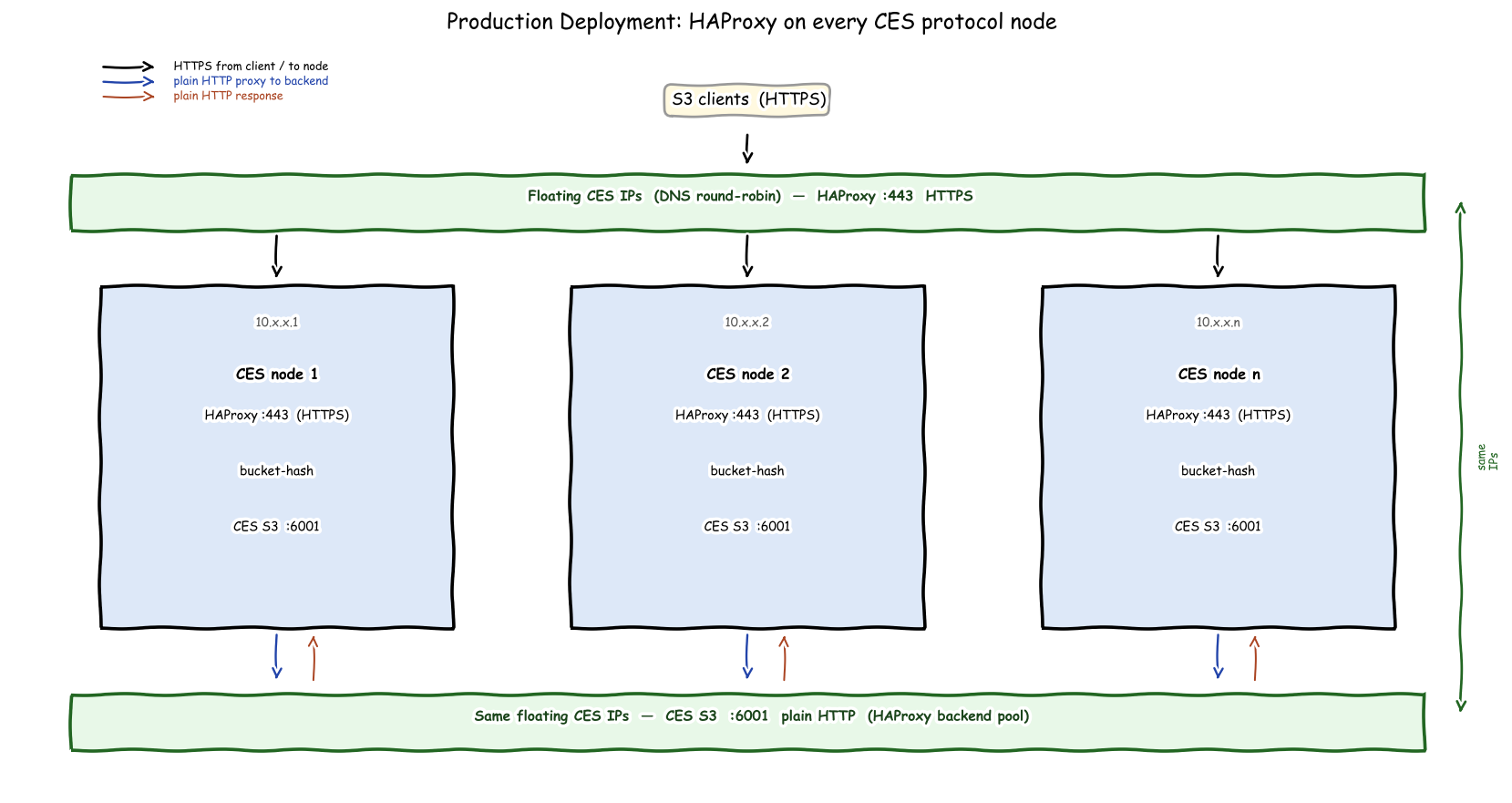
Key points for this topology:
-
SSL termination at HAProxy. HAProxy handles the TLS certificate and terminates HTTPS on
port 443. It then proxies requests to the CES S3 endpoints over plain HTTP on the internal
network. This requires enabling HTTP for CES-S3 endpoints:mms3 config change ALLOW_HTTP=true -
Backend pool = all floating CES addresses. Each HAProxy instance lists all CES protocol
nodes (by their floating IP addresses) as backends, not just the local node. This is essential
so that the consistent bucket hash can route to whichever node owns a given bucket, regardless
of which node the client connected to. Since all instances run the same config with the same
hash seeds and server IDs, they will always agree on the bucket-to-node mapping. -
Identical server IDs across all instances. The
id Nparameter on eachserverline
must be the same on every HAProxy instance. This is what guarantees that all nodes hash a
given bucket name to the same backend. -
Health checks. Keep
checkon every server line so that if a CES endpoint goes down,
HAProxy automatically stops routing to it and redistributes load. Withhash-type consistent
this only remaps the buckets that were assigned to the failed node. Ideally CES health monitoring
will quickly redistribute the CES-IP, and it will then become available to haproxy distribution again. -
No separate load-balancer VM needed. Because each protocol node runs its own HAProxy,
clients can round-robin across protocol nodes at the DNS level (multiple A records) or via
an external load balancer that does not need any S3 affinity logic – it can freely
distribute connections across nodes, because the per-node HAProxy will always apply the
correct bucket hash regardless of which node the connection lands on.
Caveats and further testing needed
This lab used small (1 KiB) objects on an untuned, low-powered Fyre environment with only two
CES nodes. Several areas warrant follow-up testing before drawing broader conclusions:
-
Object sizes. The 1 KiB object size maximises request-rate overhead and cross-node
coordination effects relative to data transfer time, likely making the sticky advantage appear
as large as possible. Testing with more representative sizes – 64 KiB, 1 MiB, 64 MiB, and
beyond the multipart threshold – is needed to understand how the speedup scales. For large
objects where network I/O dominates, the routing overhead may be proportionally smaller. -
Cluster scale. With only two backends the consistent-hash ring is very coarse: each bucket
maps to one of exactly two nodes. With more nodes, cross-node coordination under round-robin
will affect a larger fraction of requests, likely making bucket affinity more beneficial at
scale, not less. -
Performance environment. The Fyre nodes are shared VMs with no storage tuning. A
dedicated lab with proper NVMe-backed GPFS storage, tuned page pools, and multiple NICs would
give more representative absolute throughput numbers and may reveal different bottlenecks. -
LIST behaviour at scale. The marginal round-robin advantage on LIST (+3%) was observed with
a bucket already populated with ~2 million objects across two nodes. This should be re-tested
with varying bucket sizes and more backends to confirm whether the result holds or reverses.
Appendix A: haproxy.cfg
#---------------------------------------------------------------------
# Global settings
#---------------------------------------------------------------------
global
    log         127.0.0.1 local2
    chroot      /var/lib/haproxy
    pidfile     /var/run/haproxy.pid
    maxconn     4000
    user        haproxy
    group       haproxy
    daemon
    stats socket /var/lib/haproxy/stats
    ssl-default-bind-ciphers PROFILE=SYSTEM
    ssl-default-server-ciphers PROFILE=SYSTEM

#---------------------------------------------------------------------
# Defaults
#---------------------------------------------------------------------
defaults
    mode                    http
    log                     global
    option                  httplog
    option                  dontlognull
    option http-server-close
    option forwardfor       except 127.0.0.0/8
    option                  redispatch
    retries                 3
    timeout http-request    10s
    timeout queue           1m
    timeout connect         10s
    timeout client          1m
    timeout server          1m
    timeout http-keep-alive 10s
    timeout check           10s
    maxconn                 3000

#---------------------------------------------------------------------
# Sticky frontend (port 8888) — bucket-affinity via consistent hash
#---------------------------------------------------------------------
frontend s3_in
    bind *:8888

    # Extract bucket name: first host label (virtual-hosted) or first path segment (path-style)
    http-request set-var(txn.host)   hdr(host),field(1,:),lower
    acl is_vhost var(txn.host) -m end .s3.example.com
    http-request set-var(txn.bucket) var(txn.host),field(1,.)  if  is_vhost
    http-request set-var(txn.bucket) path,field(2,/)           if !is_vhost

    # ListBuckets (GET / with no bucket) — serve from any node
    acl no_bucket path -m str /
    use_backend s3_any if !is_vhost no_bucket

    default_backend s3_by_bucket

#---------------------------------------------------------------------
# Round-robin frontend (port 9999) — no affinity
#---------------------------------------------------------------------
frontend s3_in_random
    bind *:9999
    default_backend s3_any

#---------------------------------------------------------------------
# Backends
#---------------------------------------------------------------------
backend s3_by_bucket
    balance hash var(txn.bucket)
    hash-type consistent
    server ces-s3-backend1 10.17.11.153:6001  id 1 check
    server ces-s3-backend2 10.15.244.186:6001 id 2 check

backend s3_any
    balance roundrobin
    server ces-s3-backend1 10.17.11.153:6001  id 1 check
    server ces-s3-backend2 10.15.244.186:6001 id 2 check
Appendix B: GPFS Cluster Configuration
Full output of mmlsconfig and mmlscluster:
[root@ces-s3-frontend ~]# mmlsconfig
Configuration data for cluster ces-s3.cluster:
----------------------------------------------
clusterName ces-s3.cluster
clusterId 8210520008951908056
dmapiFileHandleSize 32
minReleaseLevel 6.0.1.1
tscCmdAllowRemoteConnections no
ccrEnabled yes
cipherList AUTHONLY
sdrNotifyAuthEnabled yes
autoBuildGPL yes
cesSharedRoot /scale/.cesSharedRoot
autoload yes
pagepool 1G
[ces-s3-frontend]
pagepool 4G
[ces-s3-backend1,ces-s3-backend2]
pagepool 8G
[common]
adminMode central

File systems in cluster ces-s3.cluster:
---------------------------------------
/dev/scale

[root@ces-s3-frontend ~]# mmlscluster

GPFS cluster information
========================
  GPFS cluster name:         ces-s3.cluster
  GPFS cluster id:           8210520008951908056
  GPFS UID domain:           ces-s3.cluster
  Remote shell command:      /usr/bin/ssh
  Remote file copy command:  /usr/bin/scp
  Repository type:           CCR

 Node  Daemon node name                  IP address     Admin node name                   Designation
------------------------------------------------------------------------------------------------------
   1   ces-s3-frontend.dev.fyre.ibm.com  10.15.8.107    ces-s3-frontend.dev.fyre.ibm.com  quorum
   2   ces-s3-backend1.dev.fyre.ibm.com  10.17.11.153   ces-s3-backend1.dev.fyre.ibm.com  quorum
   3   ces-s3-backend2.dev.fyre.ibm.com  10.15.244.186  ces-s3-backend2.dev.fyre.ibm.com  quorum
Appendix C: CES S3 Configuration
Full output of mms3 config list:
[root@ces-s3-frontend ~]# mms3 config list

 S3 Configuration:
 =======================
 ALLOW_HTTP : true
 DEBUGLEVEL : default
 ENABLEMD5 : false
 ENDPOINT_FORKS : 2
 ENDPOINT_FORK_PORT_BASE : 6002
 ENDPOINT_PORT : 6001
 ENDPOINT_SSL_IAM_PORT : 7005
 ENDPOINT_SSL_PORT : 6443
 GPFSDLPATH : /usr/lpp/mmfs/lib/libgpfs.so
 LOG_TO_STDERR_ENABLED : false
 LOG_TO_SYSLOG_ENABLED : true
 NC_DISABLE_ACCESS_CHECK : false
 NC_DISABLE_POSIX_MODE_ACCESS_CHECK : true
 NC_GPFS_BIN_DIR : /usr/lpp/mmfs/bin
 NC_LIFECYCLE_GPFS_ALLOW_SCAN_ON_REMOTE : true
 NC_LIFECYCLE_GPFS_ILM_ENABLED : true
 NC_LIFECYCLE_LOGS_DIR : /var/log/noobaa/lifecycle
 NC_LIFECYCLE_RUN_DELAY_LIMIT_MINS : 10
 NC_LIFECYCLE_RUN_TIME : 00:00
 NC_LIFECYCLE_TIMEOUT_MS : 28800000
 NC_LIFECYCLE_TZ : LOCAL
 NC_MASTER_KEYS_GET_EXECUTABLE : /usr/lpp/mmfs/bin/cess3_key_get
 NC_MASTER_KEYS_PUT_EXECUTABLE : /usr/lpp/mmfs/bin/cess3_key_put
 NC_MASTER_KEYS_STORE_TYPE : executable
 NSFS_DIR_CACHE_MAX_DIR_SIZE : 536870912
 NSFS_DIR_CACHE_MAX_TOTAL_SIZE : 1073741824
 NSFS_NC_CONFIG_DIR_BACKEND : GPFS
 NSFS_NC_STORAGE_BACKEND : GPFS
 S3_RDMA_ENABLED : false
 S3_RDMA_LOG_LEVEL : INFO
 S3_RDMA_USE_TELEMETRY : true
 UVTHREADPOOLSIZE : 16
 host_customization : {}
=======================
Appendix D: Warp Benchmark Commands
All benchmarks were run on ces-s3-frontend against both endpoints simultaneously.
Port 8888 = sticky (bucket-affinity), port 9999 = round-robin.
Credentials are test-only keys for this lab environment.
Before each run, the warp bucket was reset:
mmunlinkfileset scale warp-benchmark-bucket
mmdelfileset scale warp-benchmark-bucket -f
mmcrfileset scale warp-benchmark-bucket --inode-space new --inode-limit 1M:1M \
    -J /scale/testaccount/warp-benchmark-bucket
chown 1234:1234 /scale/testaccount/warp-benchmark-bucket
# PUT (1 KiB objects, concurrency 20, ~5 min)
./warp put --host 127.0.0.1:8888 \
    --access-key w7SKXyZE4phZP5aaRp6O \
    --secret-key et0uevQFVMI1cWNuWlpNzROH6eEVT2mrJkdW8nFu \
    --obj.size 1024 --noprefix --noclear

./warp put --host 127.0.0.1:9999 \
    --access-key w7SKXyZE4phZP5aaRp6O \
    --secret-key et0uevQFVMI1cWNuWlpNzROH6eEVT2mrJkdW8nFu \
    --obj.size 1024 --noprefix --noclear

# MULTIPART-PUT (2 parts x 1 KiB, concurrency 40, ~5 min)
./warp multipart-put --host 127.0.0.1:8888 \
    --access-key w7SKXyZE4phZP5aaRp6O \
    --secret-key et0uevQFVMI1cWNuWlpNzROH6eEVT2mrJkdW8nFu \
    --noprefix --noclear --parts 2 --part.size 1024 --part.concurrent 2

./warp multipart-put --host 127.0.0.1:9999 \
    --access-key w7SKXyZE4phZP5aaRp6O \
    --secret-key et0uevQFVMI1cWNuWlpNzROH6eEVT2mrJkdW8nFu \
    --noprefix --noclear --parts 2 --part.size 1024 --part.concurrent 2

# GET (1 KiB objects, concurrency 20, ~5 min)
./warp get --host 127.0.0.1:8888 \
    --access-key w7SKXyZE4phZP5aaRp6O \
    --secret-key et0uevQFVMI1cWNuWlpNzROH6eEVT2mrJkdW8nFu \
    --obj.size 1024 --noprefix --noclear

./warp get --host 127.0.0.1:9999 \
    --access-key w7SKXyZE4phZP5aaRp6O \
    --secret-key et0uevQFVMI1cWNuWlpNzROH6eEVT2mrJkdW8nFu \
    --obj.size 1024 --noprefix --noclear

# STAT / HeadObject (1 KiB objects, concurrency 20, ~5 min)
./warp stat --host 127.0.0.1:8888 \
    --access-key w7SKXyZE4phZP5aaRp6O \
    --secret-key et0uevQFVMI1cWNuWlpNzROH6eEVT2mrJkdW8nFu \
    --obj.size 1024 --noprefix --noclear

./warp stat --host 127.0.0.1:9999 \
    --access-key w7SKXyZE4phZP5aaRp6O \
    --secret-key et0uevQFVMI1cWNuWlpNzROH6eEVT2mrJkdW8nFu \
    --obj.size 1024 --noprefix --noclear

# DELETE (batch 100 obj/req, concurrency 20, runs until objects exhausted)
./warp delete --host 127.0.0.1:8888 \
    --access-key w7SKXyZE4phZP5aaRp6O \
    --secret-key et0uevQFVMI1cWNuWlpNzROH6eEVT2mrJkdW8nFu \
    --obj.size 1024 --noprefix --noclear

./warp delete --host 127.0.0.1:9999 \
    --access-key w7SKXyZE4phZP5aaRp6O \
    --secret-key et0uevQFVMI1cWNuWlpNzROH6eEVT2mrJkdW8nFu \
    --obj.size 1024 --noprefix --noclear

# LIST (concurrency 20, ~5 min)
./warp list --host 127.0.0.1:8888 \
    --access-key w7SKXyZE4phZP5aaRp6O \
    --secret-key et0uevQFVMI1cWNuWlpNzROH6eEVT2mrJkdW8nFu \
    --obj.size 1024 --noprefix --noclear

./warp list --host 127.0.0.1:9999 \
    --access-key w7SKXyZE4phZP5aaRp6O \
    --secret-key et0uevQFVMI1cWNuWlpNzROH6eEVT2mrJkdW8nFu \
    --obj.size 1024 --noprefix --noclear

# MIXED (DELETE+GET+PUT+STAT, concurrency 20, ~5 min)
./warp mixed --host 127.0.0.1:8888 \
    --access-key w7SKXyZE4phZP5aaRp6O \
    --secret-key et0uevQFVMI1cWNuWlpNzROH6eEVT2mrJkdW8nFu \
    --obj.size 1024 --noprefix --noclear

./warp mixed --host 127.0.0.1:9999 \
    --access-key w7SKXyZE4phZP5aaRp6O \
    --secret-key et0uevQFVMI1cWNuWlpNzROH6eEVT2mrJkdW8nFu \
    --obj.size 1024 --noprefix --noclear